
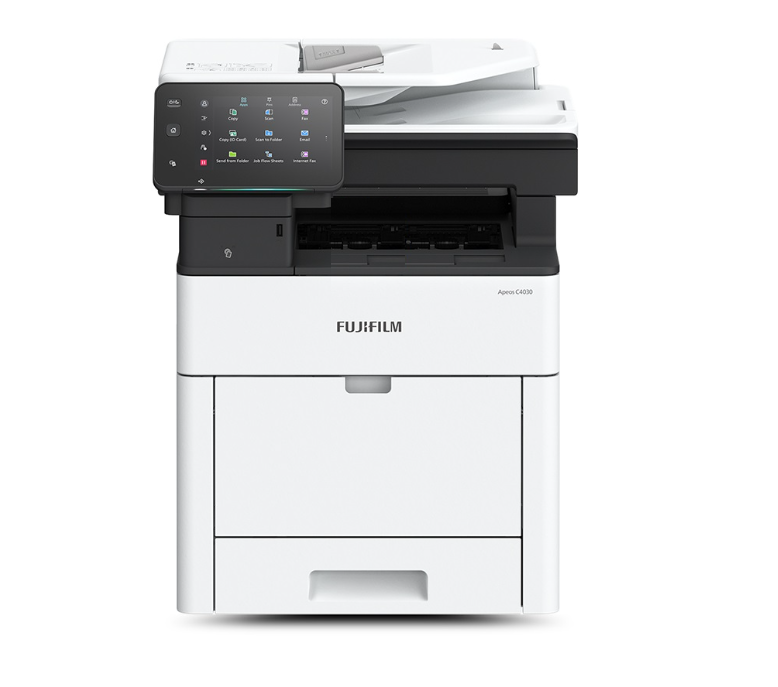
Fujifilm Apeos C3530 Colour Laser Multifunctional Printer Copier Scanner 35ppm
$3,751.11
+ Free Shipping- Copy/Print (Colour/Monochrome): C4030 40 ppm, C3530 35 ppm
- Scan (Colour/Monochrome): C4030 105 ppm, C3530 96 ppm
- Fax: Super G3 FAX
- Printing Resolution: 1,200 x 2,400 dpi
- Control Panel: Tilted Colour Touchscreen C4030 7 inches, C3530 5 inches
- Wireless LAN supported
- Mobile supported
- Cloud interactive
- Security
OVERVIEW
- Copy/Print (Colour/Monochrome): C3530 35 ppm*1
- Scan (Colour/Monochrome): C3530 96 ppm*2
- Fax*3: Super G3 FAX
- Printing Resolution: 1,200 x 2,400 dpi*4
- Control Panel: Tilted Colour Touchscreen C3530 5 inches
- Wireless LAN supported
- Mobile supported
- Cloud interactive
- Security
*1: On A4/B5 size paper. Print speed may drop due to image quality adjustment.
*2: When the DADF is used. (1 pass, 2 sided scanning. Our Standard Paper (A4), 200 dpi, to Folder.) Scanning speed varies by the document.
*3: Optional.
*4: Print Function.
A4 Colour Multifunction device, catering to your everyday business needs
Speedily usable & wide variety of supporting papers
- High-speed printing of 35 ppm*1 for colour and monochrome
- FCOT: Prints out in about 7.5 sec. on B/W, 8.0 sec. on colour
- Useful for administrative / counter services when high-volume colour printing is performed
- Fast Boot Mode prepares the operation panel in 7 seconds*2
- The control panel becomes operatable from Low Power Mode in only 1 second*3
*1: For Apeos C3530. For A4/B5 size paper. Speed may drop due to image quality adjustment.
*2: Depending on the status of the main unit and configuration of options, it may not operate or take more than 7 seconds.
*3: Please specify the time to Sleep Mode longer than the time to Low Power Mode.
Trays/feeders holding a maximum of 2,350 sheets*
Despite being compact size, the Apeos C3530 series comes standard with trays that can hold as many as 700 sheets* (Bypass Tray and Standard Tray can hold 150 sheets* and 550 sheets* respectively).
Up to three optional 550-Sheet Feeder can be installed to have one Bypass Tray and four trays in total.
* For 80 gsm paper.
Quick scanning of high-volume originals
Single-pass colour duplex scanning of 96 ppm*1.
Equipped with Duplex Automatic Document Feeder (DADF)
You can scan both sides of the original at once. Since the original is not inverted, it protects the original document
You can load originals up to 50 sheets*2
*1: For Apeos C3530. When the DADF is used. (1 pass, 2 sided scanning. Our Standard Paper (A4), 200 dpi, to Folder.) Scanning speed varies by the document.
*2: For Apeos C3530.
User-friendly 5-inch* colour touch panel
Customisable screen icon layout
Makes your routine workflow simple and smooth
Provides the same operability as A3 multifunction devices
* For Apeos C3530.
Small but excellent
Super EA-Eco toner, toner that has the industry’s smallest particle size, reproduces small characters and thin lines sharply and creates a smooth gradient.
Image Enhancement processing reproduces diagonal lines and the outlines of characters, which can become jagged when printed, more smoothly.
IReCT*, digital image adjustment technology, minimises colour misregistration.
* Image Registration Control Technology
Copy an ID card on one side of a sheet
With the ID Card Copy feature, both sides of an ID card, such as a driver’s license card or health insurance card, can be printed aligned with each other on one side of a sheet.
Space-saving IC card reader*
Designed to save space, the Apeos C3530 series can house a built-in IC card reader.
* Optional.
Efficiently combining A4 and A3 devices
The Apeos C3530 multifunction device series have the same UI and features as A3 devices. This leads to the optimum use of both A3 and A4 devices in one office and makes it easier to build the environment for Server-less On-Demand Print, minimising the trouble that comes with device management.
Strengthening the integration of the headquarters and branch stores
It is possible to automate a series of jobs to scan and send documents to the headquarters by registering settings so that you can send documents with one touch of an icon. This enables you to send reports easily even if you don’t have a computer at hand.
Reducing wasted time during customer service
Being compact, Apeos C3530 multifunction device series fits into a counter service area. You can copy or scan documents without leaving the counter and making your customer wait.
Simple layout with easy navigation
Black and gray tone UI gives better contrast for easy recognition.
- Icons are evenly spread for easy recognition
- Consistent operation steps of each function for easy recall
- Home screen personalisation for ease of access to commonly used functions
- Pin regular settings for registering frequent or repeated jobs
- Clear visible light notifications for completed or error jobs
- Subtle sound notification for alert and attention

Smartphone becomes a “portable operation panel”
Seamless connectivity with mobile devices for Copy, Fax, Print, Scan*1 jobs using the Print Utility*2 application.
- Mobile device can be used as an alternative UI for operations control to minimise common touch points
- Frequent settings can be saved as “Favourites”
- Directly send fax or email with the addresses stored in the smartphone
- Minimise printer touch points for hygiene reasons
- Quickly establish direct Wi-Fi connection by scanning the QR code on the user panel
Note: Connect to machine via wireless environment or Wi-Fi direct connection.
*1: Scan to Mobile, E-mail, Scan to Folder.
*2: It can be downloaded free of charge from Google PlayTM or App Store.
Flexibility in office layout
Supports wireless LAN environment*1.
Supports free addressing in the office with Wi-Fi support
Up to five Wi-Fi Direct multifunction devices can be connected at the same time
Supports direct mobile printing*2
Print Utility, AirPrint, and Mopria® Print Service are supported
*1: Optional.
*2: When connecting to Wi-Fi Direct.
Print out from any multifunction device within the office
With Server-less On-Demand Print*, you have the flexibility to print and collect the print outs from any of the connected multifunction devices.
Improves productivity by printing from another available multifunction device when the current device is in use
Up to 100 units can be linked
Specific job settings can be revised at the device level to save time
(1 sided to 2 sided, all monochrome)
* Optional.
Simple device management with Server-less Authentication
Server-less Authentication* enables user information to be synchronised among multifunction devices in the same group and allows administrators to reduce their workloads.
Simply tap your card to link the user ID with the multifunction device
The ID information is automatically shared with the other multifunction devices in the same network
Authentication can be performed with any devices in the office
* Optional.
SPECIFICATIONS
Type
Desktop
Memory Capacity
4 GB (Max: 4 GB)
Storage Device Capacity
128 GB
Colour Capability
Full Colour
Scan Resolution
600 x 600 dpi
Printing Resolution
1,200 x 2,400 dpi
Warm-up Time
33 seconds or less (23 degrees Celsius room temperature)
Recovery Time
(Recovery Time from Sleep Mode) 20 seconds or less (23 degrees Celsius room temperature)
Original Size
Maximum of A4, Letter, Legal*3 for both Sheet and Book
Paper Size
Max A4, Letter, Legal
Min A6*4 [64 x 127 mm when using Bypass Tray]
Image loss width Lead edge 4.0 mm, Trail edge 4.0 mm, Right/Left edge 4.0 mm
Paper Weight*5 Paper Tray 60 to 220 gsm
Bypass Tray 60 to 220 gsm
First Copy Output Time
B/W: 7.5 sec. (A4 / Monochrome priority mode)
Colour: 8.0 sec. (A4 / Colour priority mode)
PRINT FUNCTION
Type
Built-in type
Paper Size
Max A4, Letter, Legal [215.9 x 520 mm when using Bypass Tray]
Min A6*1 [64 x 127 mm when using Bypass Tray]
Image loss width Lead edge 4.0 mm, Trail edge 4.0 mm, Right/Left edge 4.0 mm
Continuous Print Speed*2 Same as the Basic Specifications / Copy Function
Printing Resolution
Standard
[PCL Driver]
Standard: 1,200 x 2,400 dpi, High Quality: 1,200 x 2,400 dpi,
High Resolution: 1,200 x 1,200 dpi
Optional
[Adobe® PostScript® 3TM Driver]
High Speed (Standard): 600 x 600 dpi, High Quality: 1,200 x
2,400 dpi, High Resolution: 1,200 x 1,200 dpi
Page Description
Language
Standard PCL5 / PCL6
Optional Adobe® PostScript® 3TM
Supported
Operating System*3
Standard
[PCL Driver]
s 11 (64 bit), Windows 10 (32 bit / 64 bit), Windows
Server 2022 (64 bit), Windows Server 2019 (64 bit), Windows
Server 2016 (64 bit), Windows Server 2012 R2 (64 bit), Windows
Server 2012 (64 bit)
[Mac OS X Driver]
macOS 12 / 11 / 10.15 / 10.14
Optional
[Adobe® PostScript® 3TM Driver]
Windows 11 (64 bit), Windows 10 (32 bit / 64 bit), Windows
Server 2022 (64 bit), Windows Server 2019 (64 bit), Windows
Server 2016 (64 bit), Windows Server 2012 R2 (64 bit), Windows
Server 2012 (64 bit)
macOS 12 / 11 / 10.15 / 10.14
Interface Standard Ethernet 1000BASE-T / 100BASE-TX / 10BASE-T, USB3.0
Optional Wireless LAN (IEEE 802.11a / b / g / n / ac)
Continuous Copy Speed*
B/W: 35 ppm
Colour: 35 ppm
Paper Tray Capacity
Standard Standard Tray: 550 sheets
Bypass Tray: 150 sheets
Optional 550-Sheet Feeder: 550 sheets
Max 2,350 sheets [Standard + 550-Sheet Feeder x 3]
Output Tray Capacity*7 250 sheets
Power Supply AC220-240 V +/- 10 %, 8 A, 50/60 Hz common
Maximum Power
Consumption
1,450 W (AC240 V +/- 10 %)
Sleep Mode: 0.4 W (AC230 V)
Low Power Mode: 11 W (AC230 V)
Ready Mode: 83 W (AC230 V)
Dimensions
W 420 x D 500*8 x H 565 mm
Weight
34 kg

Reviews
There are no reviews yet.